To find out, we ran an experiment where we gave the same text to ChatGPT and to a human editor, asking them to improve the language and style and to clearly explain the changes they made.
The experiment showed that both editors improved the text overall, but the human editor made more extensive and reliable changes, and only the human editor was able to properly explain their changes.
Our general conclusion is explained below, followed by our methodology and an in-depth exploration of each edit.
Overall, the results indicate that, while both edits certainly improved the text overall, the human editor was substantially better than ChatGPT.
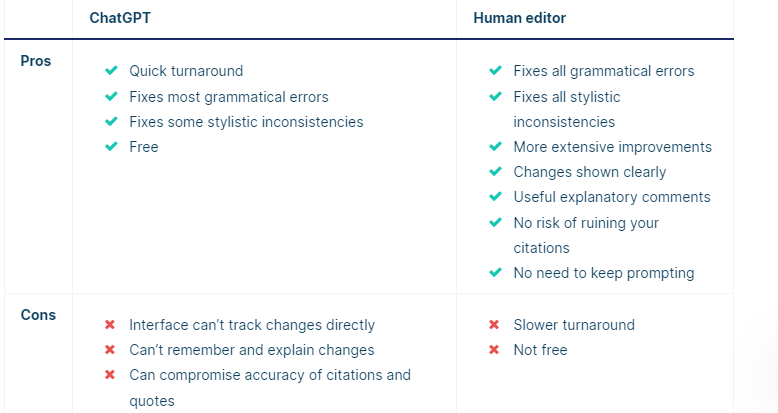
ChatGPT has some advantages in terms of convenience, but technical issues make the process less smooth than it could be.
In terms of quality, ChatGPT can ensure basic correctness, but the human editor is better at improving fluency, clarity, and conciseness. ChatGPT’s tendency to create citation errors and modify quotations is also worrying. And it seems incapable of explaining the changes it made, struggling to even remember what it changed, let alone explain why.
Because of this, we think that ChatGPT can be a quick and cheap way to proofread your writing, but we recommend checking the results carefully for errors and using a Proofreading & Editing service for more comprehensive and higher-quality editing (or try the Scribbr Grammar Checker for a dedicated online proofreading tool).
To test ChatGPT’s capabilities as a proofreader and editor, we compared it to a professional Scribbr editor, trained to edit academic texts for issues related to language, style, and consistency and provide clear, useful feedback to the author.
We created a 1,000-word testing text to give to both of them, including issues like spelling mistakes, punctuation errors, stylistic inconsistencies, and confusing phrasings. You can see the full text by opening the document below.
The editor was instructed to edit the text according to the conventions of US English and 7th-edition APA Style and to follow the usual Scribbr approach of editing for language and style, not making changes to the arguments of the text.
To align ChatGPT’s approach with these guidelines, we used the following prompt:
ChatGPT’s interface is not able to track changes in the same way as Word or Google Docs, so it wasn’t always obvious what it had changed in the text. It was also unable to edit the whole text at once, possibly due to a word limit. Its answers cut off partway through the text.
When asked to “continue,” it misunderstood and started predicting how the text would continue from the point where it had stopped, rather than editing. When prompted to return to editing, it got confused for a while and started creating completely unrelated text.
We then tried prompting it again with the original text from after the point where it had stopped. It again cut off before the end, so we re-prompted it again. This time, since it got to the end, it was finally able to list and explain the changes it had made (for the last part of the text), but its list was quite inaccurate, so we asked it for clarification, which didn’t help much.
To get a list of changes for the whole text, we ran it through ChatGPT again in three parts, in a new chat. Overall, the process took about an hour, a quick turnaround for an editing assignment even with all the obstacles encountered in the process.
Edits
ChatGPT’s edits certainly improved the text overall, fixing both overt grammatical errors and some stylistic inconsistencies. But it wasn’t always consistent in different attempts, sometimes addressing certain problems and sometimes missing them.
Issues that it missed most of the time or every time include:
Use of a hyphen in place of an em dash
Awkward use of “wherein”
Misuse of a colon at the end of an incomplete sentence
The APA-specific recommendation of writing words like “nonsmokers” as one closed-up word, rather than hyphenated (“non-smokers”)
Additionally, some of the changes it did make were poor. It added a comma to a piece of quoted text, which is not appropriate since it makes the quotation inaccurate. And in one attempt, it randomly changed the publication year of a source in a citation (from “GOLD, 2019” to “GOLD, 2022”), a change that would ruin the citation if the author didn’t notice it.
ChatGPT was never able to accurately describe and explain the changes it had made. It attempted to list some changes, but it always missed a lot of them, and it usually made a lot of errors in describing the changes it had made.
In fact, many of the changes it described simply hadn’t happened—it claimed to have added text that wasn’t there or to have removed text that was never in the original. Because of this, it wouldn’t be easy for the author to check that all changes were appropriate.
Even when it did accurately describe a change that genuinely improved the text, its justification for making that change was often misleading. It seems like ChatGPT has good instincts for what to change but a very limited ability to remember and justify its changes.
Human editor results
Our Scribbr editor presented the edited text according to our usual process, as a Word document with tracked changes and explanatory comments. You can download the full edited document below.
Pros and cons
Fixes all grammatical errors
Fixes all stylistic inconsistencies and ensures consistency with APA Style guidelines
Improves concision, clarity, and fluency of text more extensively
Changes shown clearly and easy to accept or reject
Comments asking clarifying questions, making suggestions, and explaining changes
No risk of illogical changes to citations, quotations, etc.
No need to keep prompting the editor to get what you want
Slower turnaround (one-, three-, or seven-day deadlines, but editor may finish sooner)
Not free
Tracking changes directly in the document contributes to a good editing service. If your editor rephrases an unclear sentence, you can see exactly what they’ve changed and whether it matches your intended meaning, and you can reverse the changes if not.
Additionally, the editor left comments in the document to explain changes that might be unclear, to ask the author to clarify ambiguities, and to point out any majorly reworked sentences that the author should check still match with their intended meaning.
This ensures that the author fully understands the logic behind the changes and can learn from them for future writing. It also gives them the opportunity to double-check that the final text expresses what they meant to express.
Naturally, the human editor also didn’t encounter any of the technical issues that ChatGPT had with longer texts or with keeping track of what task it was meant to be performing.
The human editor corrected all of the basic grammatical errors, spelling mistakes, punctuation issues, and stylistic inconsistencies that were caught by ChatGPT too. They also addressed all of the issues that ChatGPT normally missed:
Hyphen in place of an em dash
Awkward use of “wherein”
Misuse of a colon
APA recommendation about writing words like “nonsmokers”
The human editor also went beyond what ChatGPT was capable of in terms of ensuring that sentences were clear, fluent, and concise in expressing the intended meaning. They generally reworked sentences more extensively and creatively than ChatGPT, resulting in a significantly smoother final text.
The human editor’s explanations of their changes were drastically better than ChatGPT’s. Comments were used to:
Educate the author about the logic behind changes that might be hard to understand
Ask clarifying questions and make suggestions for the author to follow up on
Prompt the author to check that a rephrased sentence still expresses the intended meaning
Unlike ChatGPT, the human editor obviously had no problem keeping track of what changes had been made, and their explanations of language guidelines were clear and accurate, sometimes linking to other resources to provide further explanation of an issue.
In this way, a human-edited text provides you with a much clearer and more trustworthy account of exactly what was changed and why, and it provides the opportunity to change back anything that doesn’t work for you.
Other interesting articles
If you want more tips on using AI tools, understanding plagiarism, and citing sources, make sure to check out some of our other articles with explanations, examples, and formats.